


SINGCALL Tuya WiFi Intelligent Healthcare SOS Wireless Caregiver Alert Call Button Alarm for Patient Handicapped Elderly Children Nurse Calling Smart Pager (only Supports 2.4GHz Wi-Fi)
SINGCALL Tuya WiFi Intelligent Healthcare SOS Wireless Caregiver Alert Call Button Alarm for Patient Handicapped Elderly Children Nurse Calling Smart Pager (only Supports 2.4GHz Wi-Fi)
Couldn't load pickup availability
- 24/7 Customer Support
- Risk-Free 30-Day Returns
- Fast & Reliable U.S. Shipping
Contact Information
Contact Information
30-Day Hassle-Free Returns
30-Day Hassle-Free Returns
Not satisfied? Return your order within 30 days for a full refund or exchange — simple and easy.
✔ Easy return process
✔ Fast refunds
✔ No hidden conditions
Fast U.S. Shipping
Fast U.S. Shipping
We ship within the United States only — no international delays.
✔ Processing time: 1–2 business days
✔ Delivery time: 3–7 business days
✔ Real-time tracking available
👉 Track your order anytime from the header via Track Order
About This
- Portable Caregiver Pager: The big attractive button makes the calling more convenient and easy for patients,elderly,children,residents,disabled,living alone,handicapped,sick,pregnant who are seeking help. Get attention of others without yelling. The emergency button is easy to carry and can be put in pocket, hung around neck, or taped to the wall. Multiple Application Scenarios: The pager system can be applied to villa, club, recreation center, hotel, home, office building, meeting room etc.
- Connected to Phone: This WiFi emergency button can be connected to phone to realize remote push. When encountering danger, the elderly can push the SOS Transmitter and the signal will be send to the phone. Stable registration, long-distance transmit, no messy code
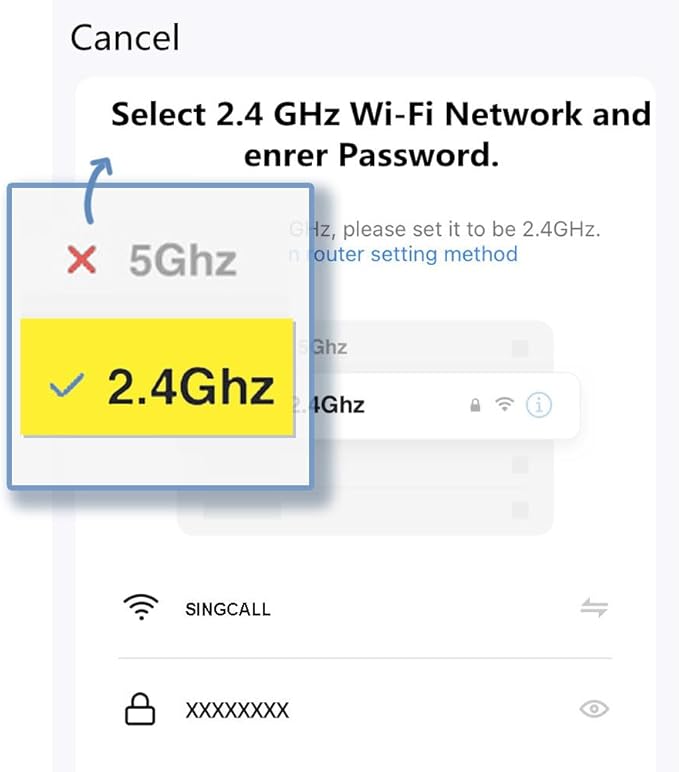
- Only Supports 2.4GHz Wi-Fi: The personal alarm button needs to be paired with the smartphone in the 2.4GHz WIFI environment. After the pairing is successful, the Tuya wifi call button needs to always be in the WIFI environment where it was paired, and the paired smartphone only needs to connect to the network. Even if you are in another city, your smartphone can receive alarm notifications from Tuya wifi call button
- Improved Safety: This Tuya SOS smart call button allows caregivers to respond to patient requests more quickly, reducing the time it takes for patients to receive assistance and streamlining communication. With the ability to quickly call for help, patients are less likely to experience accidents or injuries while waiting for assistance
- Share Function: The Tuya caregiver button can be shared to other smartphones through the sharing function, so that multiple smartphones can receive alarm notifications. When our family members also want to receive calls from our parents, they can download the Tuya App on their smartphones and share the panic alarm button on their main account to other accounts. This way, when our parents press the button, other family members can be notified and we can take better care of our ageing parents
Overview
- Color : Blue
- Brand : SINGCALL
- Power Source : Battery Powered
- Compatible Devices : Smartphone
- Battery Description : Lithium




WE MAKE SMART LIVING SIMPLE.
OUR TEAM HELPS SECURE YOUR HOME.
SmartHomeValueHub helps homeowners create safer, smarter, and more convenient living spaces with trusted smart home solutions built for everyday life.
From smart security cameras and smart locks to video doorbells, thermostats, lighting, and home automation essentials — we focus on products that improve real comfort, safety, and efficiency.
Our goal is simple: better protection, lower energy costs, and smarter daily living for every home.


Why Homeowners Trust SmartHomeValueHub
✔ Easy Setup
✔ Matter Compatible
✔ Smart Security
✔ Energy Saving

50K
HaSMART DEVICES INSTALLEDppy Clients
15+
YEARS OF SMART HOME EXPERTISE
98%
CUSTOMER SATISFACTION RATE
365
RELIABLE SUPPORT YEAR-ROUND


Smarter Security. Lower Bills. Easier Living.


SMART HOME FAQ
Yes — many modern devices support multiple platforms.
Matter-certified devices can work across Alexa, Google Home, and Apple HomeKit at the same time.
Not always.
Smart bulbs, plugs, cameras, and video doorbells are often easy DIY installations, while full security systems may need professional setup.
Many devices still work manually or through local control.
You may lose remote app access, but locks, lights, and thermostats often continue basic functions.
Security depends on the device and setup.
Use strong passwords, trusted brands, firmware updates, and secure Wi-Fi for better protection. Privacy and unauthorized access are common concerns in smart homes.
Most homeowners start with:
Smart Security Cameras
Smart Door Locks
Smart Thermostats
Smart Plugs
Video Doorbells
Yes.
Smart thermostats and smart plugs help reduce wasted energy by automating heating, cooling, and power usage.
It depends on your ecosystem.
Alexa → widest compatibility
Google Home → strong for Android users
Apple HomeKit → best privacy
Home Assistant → advanced control
Smart Home Tips, Trends & Buying Guides
-

How to Choose the Best Smart Lighting for Every...
Choosing the right smart lighting can improve comfort, convenience, ambiance, and energy efficiency throughout your home. This 2026 guide explains how to select smart bulbs, LED strip lights, and connected...
How to Choose the Best Smart Lighting for Every...
Choosing the right smart lighting can improve comfort, convenience, ambiance, and energy efficiency throughout your home. This 2026 guide explains how to select smart bulbs, LED strip lights, and connected...
-

How to Choose the Best Smart Home Hub: Alexa vs...
Choosing the right smart home hub determines how easily your devices connect, automate, and work together. This 2026 guide compares Alexa, Google Home, and Apple Home across compatibility, voice control,...
How to Choose the Best Smart Home Hub: Alexa vs...
Choosing the right smart home hub determines how easily your devices connect, automate, and work together. This 2026 guide compares Alexa, Google Home, and Apple Home across compatibility, voice control,...
-

How Smart Home Sensors Can Make Your Home Safer...
Smart home sensors are transforming the way homeowners protect and manage their homes. From detecting motion and water leaks to monitoring indoor air quality, temperature, and entry points, connected sensors...
How Smart Home Sensors Can Make Your Home Safer...
Smart home sensors are transforming the way homeowners protect and manage their homes. From detecting motion and water leaks to monitoring indoor air quality, temperature, and entry points, connected sensors...


