


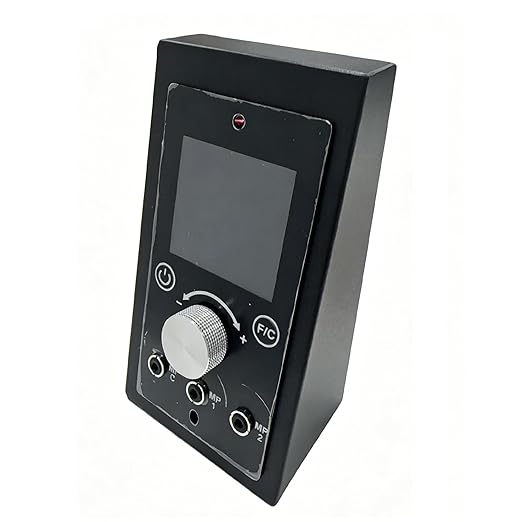
WiFi PID Upgraded Digital Thermostat Controller Board Replacement with APP Smart Control Bluetooth Function Compatiable for Pit Boss Pellet Grills
WiFi PID Upgraded Digital Thermostat Controller Board Replacement with APP Smart Control Bluetooth Function Compatiable for Pit Boss Pellet Grills
Couldn't load pickup availability
- 24/7 Customer Support
- Risk-Free 30-Day Returns
- Fast & Reliable U.S. Shipping
Contact Information
Contact Information
30-Day Hassle-Free Returns
30-Day Hassle-Free Returns
Not satisfied? Return your order within 30 days for a full refund or exchange — simple and easy.
✔ Easy return process
✔ Fast refunds
✔ No hidden conditions
Fast U.S. Shipping
Fast U.S. Shipping
We ship within the United States only — no international delays.
✔ Processing time: 1–2 business days
✔ Delivery time: 3–7 business days
✔ Real-time tracking available
👉 Track your order anytime from the header via Track Order
About This
- 【COMPATIBILITY】The thermostat controller is designed for most Pit boss Pellet Smoker grills (PB340, PB440D, PB440TG1, PB440TGR1, PB700D, PB700R1, PB700S, PB700S1, PB700T1, PB700FB, PB700FBM2, PB700SC, PB700R2, PB700S2 ,PB820D, PB820T1, PB820S, PB820FB, PB820FBC, PB820SC, PB1000S1, PB1000T1, PB1000SC1, PB1000R2, PB1000T2, PB1000R1)
- 【APP Installation】Download and install the” SmartLife” APP in the Apple Store or Google Play. Make sure the grill is within the range of WiFi, the Controller is power on and enter working mode.Open mobile’s Bluetooth option.If the WiFi icon on the controller flashes, it indicates that the device has entered the networking setup mode. If it doesn't flash, press and hold the knob for 3 seconds.Open the Tuya APP, and click on the "+" icon in the upper right corner to select "Add Device".Enter your 2.4GHz WiFi router name and password .(NOT SUPPORT 5G router) Waiting 10-30 seconds, APP will display controller information.
- 【FUNCTIONS】Power: Short press to turn on; long press while on to turn off.While in the ignition state, a long press will turn it off.Temperature switch:Switched [F/C ] of top left for different country customer.Temperature setting:180- 500°F.Probe temperature setting: when the probe temperature reaches the set temperature, the grill will enter the heating preservation state and the buzzer will alert you. Smoke: Rotate one gear forward at 180°F and SP6 to SP1 will appear in sequence. For the first time, we recommend using SP4 for a trial. Knob: Left and right rotation is used to adjust the set temperature, and short press is to confirm the setting. Long press is for resetting the network.
- 【PACKAGE 】1 thermostat controller;1 Instructions;1 Screwdriver
- 【SERVICE】With every purchase of this Wi-Fi-enabled thermostat, we’ll include a free mounting bracket. This bracket solves the problem of the controller’s size not matching the opening of your pellet stove. Additionally, its angled design provides a more comfortable viewing angle, making it easier for you to see the temperature on the controller panel.
- We will include a free mounting bracket for this Wi-Fi thermostat in a separate package. However, since this bracket is currently out of stock and won't be available for over a month, If you’re unable to wait but the thermostat is compatible with your pellet grill, you're welcome to keep it as is, and we'll offer you a $10 discount as compensation. Please contact us if you need assistance.
Overview
- Brand : OUTGIK
- Special Feature : Led Temperature Display
- Color : WIFI Controller
- Age Range (Description) : Adult
- Included Components : Digital Control Panel, Mounting Hardware
- Outer Material : Plastic
- Specification Met : Digital Temperature Control
- Display Type : Led Digital
- Connectivity Technology : Digital
- Product Care Instructions : Wipe Clean With Dry Cloth




WE MAKE SMART LIVING SIMPLE.
OUR TEAM HELPS SECURE YOUR HOME.
SmartHomeValueHub helps homeowners create safer, smarter, and more convenient living spaces with trusted smart home solutions built for everyday life.
From smart security cameras and smart locks to video doorbells, thermostats, lighting, and home automation essentials — we focus on products that improve real comfort, safety, and efficiency.
Our goal is simple: better protection, lower energy costs, and smarter daily living for every home.


Why Homeowners Trust SmartHomeValueHub
✔ Easy Setup
✔ Matter Compatible
✔ Smart Security
✔ Energy Saving

50K
HaSMART DEVICES INSTALLEDppy Clients
15+
YEARS OF SMART HOME EXPERTISE
98%
CUSTOMER SATISFACTION RATE
365
RELIABLE SUPPORT YEAR-ROUND


Smarter Security. Lower Bills. Easier Living.


SMART HOME FAQ
Yes — many modern devices support multiple platforms.
Matter-certified devices can work across Alexa, Google Home, and Apple HomeKit at the same time.
Not always.
Smart bulbs, plugs, cameras, and video doorbells are often easy DIY installations, while full security systems may need professional setup.
Many devices still work manually or through local control.
You may lose remote app access, but locks, lights, and thermostats often continue basic functions.
Security depends on the device and setup.
Use strong passwords, trusted brands, firmware updates, and secure Wi-Fi for better protection. Privacy and unauthorized access are common concerns in smart homes.
Most homeowners start with:
Smart Security Cameras
Smart Door Locks
Smart Thermostats
Smart Plugs
Video Doorbells
Yes.
Smart thermostats and smart plugs help reduce wasted energy by automating heating, cooling, and power usage.
It depends on your ecosystem.
Alexa → widest compatibility
Google Home → strong for Android users
Apple HomeKit → best privacy
Home Assistant → advanced control
Smart Home Tips, Trends & Buying Guides
-

How to Choose the Best Smart Lighting for Every...
Choosing the right smart lighting can improve comfort, convenience, ambiance, and energy efficiency throughout your home. This 2026 guide explains how to select smart bulbs, LED strip lights, and connected...
How to Choose the Best Smart Lighting for Every...
Choosing the right smart lighting can improve comfort, convenience, ambiance, and energy efficiency throughout your home. This 2026 guide explains how to select smart bulbs, LED strip lights, and connected...
-

How to Choose the Best Smart Home Hub: Alexa vs...
Choosing the right smart home hub determines how easily your devices connect, automate, and work together. This 2026 guide compares Alexa, Google Home, and Apple Home across compatibility, voice control,...
How to Choose the Best Smart Home Hub: Alexa vs...
Choosing the right smart home hub determines how easily your devices connect, automate, and work together. This 2026 guide compares Alexa, Google Home, and Apple Home across compatibility, voice control,...
-

How Smart Home Sensors Can Make Your Home Safer...
Smart home sensors are transforming the way homeowners protect and manage their homes. From detecting motion and water leaks to monitoring indoor air quality, temperature, and entry points, connected sensors...
How Smart Home Sensors Can Make Your Home Safer...
Smart home sensors are transforming the way homeowners protect and manage their homes. From detecting motion and water leaks to monitoring indoor air quality, temperature, and entry points, connected sensors...


