


V3 Pro Voice Remote Control fit for vSeeBox V1/V2, V3/V2/V1/V5 Pro
V3 Pro Voice Remote Control fit for vSeeBox V1/V2, V3/V2/V1/V5 Pro
Couldn't load pickup availability
- 24/7 Customer Support
- Risk-Free 30-Day Returns
- Fast & Reliable U.S. Shipping
Contact Information
Contact Information
30-Day Hassle-Free Returns
30-Day Hassle-Free Returns
Not satisfied? Return your order within 30 days for a full refund or exchange — simple and easy.
✔ Easy return process
✔ Fast refunds
✔ No hidden conditions
Fast U.S. Shipping
Fast U.S. Shipping
We ship within the United States only — no international delays.
✔ Processing time: 1–2 business days
✔ Delivery time: 3–7 business days
✔ Real-time tracking available
👉 Track your order anytime from the header via Track Order
About This
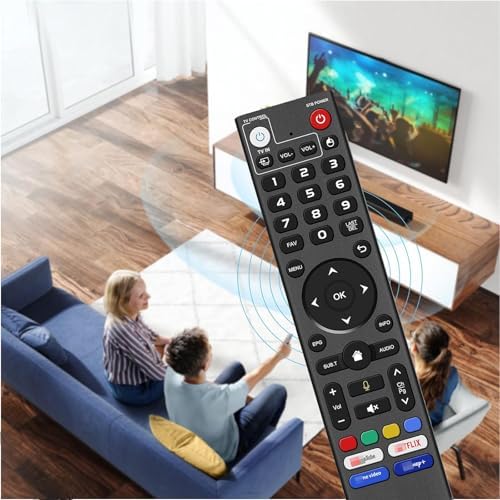
- [Compatible Models] This is V3 Pro It works with the following models, for vSeeBox V5 Pro / V3 Plus/V3 Pro / V2 Pro / V1 Pro/V1 Max/Elite/Max. Tips: V1 Max, V1 Pro, V2 Pro (No Voice Command Feature). 【Note: Please make sure your box model is in the above list.】
- [Voice Control] With voice fountion.Switc-channels, adjust volume, search movies by voice.V1 Max, V1 Pro, V2 Pro (No Voice Command Feature)
- [Two working modes] V3 working mode and V2 working mode. Press and hold the number key 5 for more than 10 seconds and the indicator light flashes, indicating that the mode switch is successful. V3 Pro working mode is applicable to V3 Pro; V2 Pro working mode is applicable to V1 Pro/V2 Pro/Max/Elite.(Note: Vseebox V3 remote control defaults to V3 working mode)
- [How to Use] the V3 Remote Control On V1 Pro/V2 Pro/Max/Elite, Press and hold the OK and vol- keys simultaneously (about five seconds) until the remote control indicator light continues to flash, which means the Bluetooth of the V3 remote control is enabled.Pair the remote control under System Settings - Bluetooth - Pair New Device, find the remote control, and connect to. (If it is not found, it may be that Bluetooth is not turned on. Please press and hold the OK and vol- keys on the remote control at the same time to turn on Bluetooth)
- [After-sale Service] Our Xiaodib Remote Control comes with an unlimited return and refund service in 90 days. If you have any query, please contact us and we will get back to you as soon as possible within 24 hours.
Overview
- Brand : Xiaodib
- Special Feature : Lightweight
- Color : Black
- Max Number of Supported Devices : 1
- Compatible Devices : Television




WE MAKE SMART LIVING SIMPLE.
OUR TEAM HELPS SECURE YOUR HOME.
SmartHomeValueHub helps homeowners create safer, smarter, and more convenient living spaces with trusted smart home solutions built for everyday life.
From smart security cameras and smart locks to video doorbells, thermostats, lighting, and home automation essentials — we focus on products that improve real comfort, safety, and efficiency.
Our goal is simple: better protection, lower energy costs, and smarter daily living for every home.


Why Homeowners Trust SmartHomeValueHub
✔ Easy Setup
✔ Matter Compatible
✔ Smart Security
✔ Energy Saving

50K
HaSMART DEVICES INSTALLEDppy Clients
15+
YEARS OF SMART HOME EXPERTISE
98%
CUSTOMER SATISFACTION RATE
365
RELIABLE SUPPORT YEAR-ROUND


Smarter Security. Lower Bills. Easier Living.


SMART HOME FAQ
Yes — many modern devices support multiple platforms.
Matter-certified devices can work across Alexa, Google Home, and Apple HomeKit at the same time.
Not always.
Smart bulbs, plugs, cameras, and video doorbells are often easy DIY installations, while full security systems may need professional setup.
Many devices still work manually or through local control.
You may lose remote app access, but locks, lights, and thermostats often continue basic functions.
Security depends on the device and setup.
Use strong passwords, trusted brands, firmware updates, and secure Wi-Fi for better protection. Privacy and unauthorized access are common concerns in smart homes.
Most homeowners start with:
Smart Security Cameras
Smart Door Locks
Smart Thermostats
Smart Plugs
Video Doorbells
Yes.
Smart thermostats and smart plugs help reduce wasted energy by automating heating, cooling, and power usage.
It depends on your ecosystem.
Alexa → widest compatibility
Google Home → strong for Android users
Apple HomeKit → best privacy
Home Assistant → advanced control
Smart Home Tips, Trends & Buying Guides
-

How to Choose the Best Smart Garage Door Opener...
Upgrade your garage with a smart garage door opener that offers convenient smartphone control, remote access, and enhanced home security. This comprehensive 2026 buying guide explains how to compare WiFi...
How to Choose the Best Smart Garage Door Opener...
Upgrade your garage with a smart garage door opener that offers convenient smartphone control, remote access, and enhanced home security. This comprehensive 2026 buying guide explains how to compare WiFi...
-

How to Choose the Best Smart Smoke and Carbon M...
Protect your home with the right smart smoke and carbon monoxide detectors. This comprehensive 2026 buying guide explains how to compare smoke detection technologies, carbon monoxide monitoring, smartphone notifications, interconnected...
How to Choose the Best Smart Smoke and Carbon M...
Protect your home with the right smart smoke and carbon monoxide detectors. This comprehensive 2026 buying guide explains how to compare smoke detection technologies, carbon monoxide monitoring, smartphone notifications, interconnected...
-

How to Choose the Best Smart Blinds and Shades ...
Upgrade your home with smart blinds and motorized shades that combine convenience, privacy, and energy efficiency. This comprehensive buying guide explains how to choose the right smart window coverings, including...
How to Choose the Best Smart Blinds and Shades ...
Upgrade your home with smart blinds and motorized shades that combine convenience, privacy, and energy efficiency. This comprehensive buying guide explains how to choose the right smart window coverings, including...


