


DEVO G1 Keyless Entry Deadbolt Smart Lock with Camera, Doorbell,Fingerprint
DEVO G1 Keyless Entry Deadbolt Smart Lock with Camera, Doorbell,Fingerprint
Couldn't load pickup availability
- 24/7 Customer Support
- Risk-Free 30-Day Returns
- Fast & Reliable U.S. Shipping
Contact Information
Contact Information
30-Day Hassle-Free Returns
30-Day Hassle-Free Returns
Not satisfied? Return your order within 30 days for a full refund or exchange — simple and easy.
✔ Easy return process
✔ Fast refunds
✔ No hidden conditions
Fast U.S. Shipping
Fast U.S. Shipping
We ship within the United States only — no international delays.
✔ Processing time: 1–2 business days
✔ Delivery time: 3–7 business days
✔ Real-time tracking available
👉 Track your order anytime from the header via Track Order
About This
- 【Versatile Keyless Entry Door Lock】6-in-1 video smart lock with camera & doorbell featuring 6 unlocking methods: fingerprint, app remote control, IC card, passcode, traditional key and voice control. Compatible with Alexa and Google Voice Assistant, this lock offers enhanced convenience and flexibility for every scenario.
- 【Remote Control & Video Storage】Manage your smart lock with TUYA APP. Remotely unlock, generate one-time passwords, manage users and real-time notifications. Enable real-time monitoring and video storage settings in the app. Enjoy free storage for the first month, up to 30 video clips and images can be saved and automatically overwritten every 3 days. After the first month, video storage will be charged, while all other features remain free. Suitable for home, apartment, office and hotel.
- 【Charging is required before first use】10000mAh Long Lasting Battery, with a 10,000 mAh rechargeable battery, this front door lock offers long-lasting performance. It withstands temperatures from 5°F to 122°F and has an IP65 water resistance rating for enhanced durability. Upon receiving the product, please fully charge the battery before use for optimal performance.
- 【Enhanced Security and Monitoring】 Keep an eye on your doorstep with HD camera, and communicate easily using two-way audio. Automatic recording ensures you never miss a moment. Benefit from features like auto-lock, privacy mode, low battery alerts, and an anti-peeping keypad for comprehensive home security.
- 【Effortless Installation and Worry-Free Support】 Install this smart lock BHMA Certified on most standard US doors in just 15 minutes using a screwdriver—no drilling needed. Precautions for Power Consumption of Smart Locks. The key precautions for power consumption during the use of smart locks are summarized into three categories as follows, covering daily power consumption standards, battery life influencing factors and abnormal power consumption troubleshooting guidelines, to help users standardize usage and extend battery service life.
- 1. Power Consumption of Daily Functions The power consumption of conventional daily functions of the smart lock is standardized as follows: Standby State: The average daily power consumption is about 3mAh. Remote Unlocking: A single motor drive for remote unlocking consumes approximately 50.0mAh of power. Human Body Capture & Data Upload: A single human body capture and network upload operation consumes 4-5mAh of power.
- 2. Main Factors Affecting Battery Endurance Network Signal: When the Wi-Fi signal is weak, the network module will repeatedly search and connect to the network, resulting in a 20%-40% increase in overall power consumption. In extremely poor signal environments, the power consumption increment can reach more than 50%. Usage Frequency: Frequent execution of remote control operations, video capture and other active functions will significantly increase the daily power consumption of the device. Environmental Factors: Low-temperature environments will cause the effective capacity of the battery to decrease by about 30%.
- 3. Troubleshooting Guidelines for Abnormal Rapid Power Consumption First, conduct a network inspection. Network instability is a major cause of unexpected power drain. The installation distance between the smart lock and the router should be reasonably controlled, with a recommended range within 10 meters. No more than two partition walls should separate the devices. This ensures continuous and stable network signals and prevents repeated signal searching and reconnection that consumes extra power.
- Second, check functional settings. Always-on active sensing functions, including face recognition and loitering detection, generate considerable power loss. In high-traffic scenarios, continuous activation of these features can increase overall power consumption by an additional 20% to 30%. To optimize battery life, disable unnecessary uninterrupted sensing functions when full-time monitoring is not required.
- Third, inspect installation quality and hardware conditions. Multiple hardware faults may lead to hidden power consumption. Check for short circuits caused by squeezed internal wires, damaged flexible flat cables, insufficient lubrication of the lock body structure, and oxidation on battery contact points. These minor hardware abnormalities can cause abnormal current conduction and continuous invalid power loss. By following the above standardized troubleshooting process, most abnormal fast power consumption issues of the smart lock can be accurately located and effectively
Overview
- Brand : Devo
- Special Feature : App Remote, Auto-Lock, IC Card, Passcode Unlock, Touchscreen
- Lock Type : Deadbolt
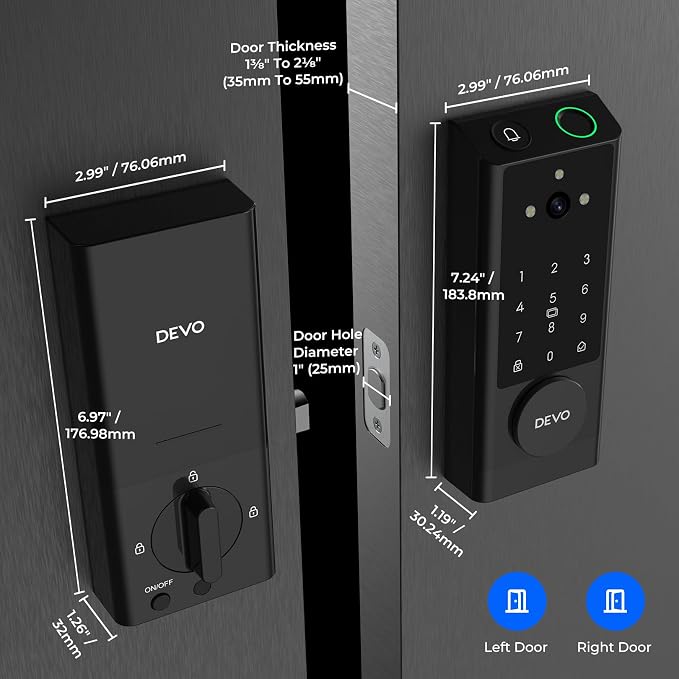
- Item dimensions L x W x H : 2.99 x 1.19 x 7.24 inches
- Material : Aluminum




WE MAKE SMART LIVING SIMPLE.
OUR TEAM HELPS SECURE YOUR HOME.
SmartHomeValueHub helps homeowners create safer, smarter, and more convenient living spaces with trusted smart home solutions built for everyday life.
From smart security cameras and smart locks to video doorbells, thermostats, lighting, and home automation essentials — we focus on products that improve real comfort, safety, and efficiency.
Our goal is simple: better protection, lower energy costs, and smarter daily living for every home.


Why Homeowners Trust SmartHomeValueHub
✔ Easy Setup
✔ Matter Compatible
✔ Smart Security
✔ Energy Saving

50K
HaSMART DEVICES INSTALLEDppy Clients
15+
YEARS OF SMART HOME EXPERTISE
98%
CUSTOMER SATISFACTION RATE
365
RELIABLE SUPPORT YEAR-ROUND


Smarter Security. Lower Bills. Easier Living.


SMART HOME FAQ
Yes — many modern devices support multiple platforms.
Matter-certified devices can work across Alexa, Google Home, and Apple HomeKit at the same time.
Not always.
Smart bulbs, plugs, cameras, and video doorbells are often easy DIY installations, while full security systems may need professional setup.
Many devices still work manually or through local control.
You may lose remote app access, but locks, lights, and thermostats often continue basic functions.
Security depends on the device and setup.
Use strong passwords, trusted brands, firmware updates, and secure Wi-Fi for better protection. Privacy and unauthorized access are common concerns in smart homes.
Most homeowners start with:
Smart Security Cameras
Smart Door Locks
Smart Thermostats
Smart Plugs
Video Doorbells
Yes.
Smart thermostats and smart plugs help reduce wasted energy by automating heating, cooling, and power usage.
It depends on your ecosystem.
Alexa → widest compatibility
Google Home → strong for Android users
Apple HomeKit → best privacy
Home Assistant → advanced control
Smart Home Tips, Trends & Buying Guides
-

How to Choose the Best Smart Lighting for Every...
Choosing the right smart lighting can improve comfort, convenience, ambiance, and energy efficiency throughout your home. This 2026 guide explains how to select smart bulbs, LED strip lights, and connected...
How to Choose the Best Smart Lighting for Every...
Choosing the right smart lighting can improve comfort, convenience, ambiance, and energy efficiency throughout your home. This 2026 guide explains how to select smart bulbs, LED strip lights, and connected...
-

How to Choose the Best Smart Home Hub: Alexa vs...
Choosing the right smart home hub determines how easily your devices connect, automate, and work together. This 2026 guide compares Alexa, Google Home, and Apple Home across compatibility, voice control,...
How to Choose the Best Smart Home Hub: Alexa vs...
Choosing the right smart home hub determines how easily your devices connect, automate, and work together. This 2026 guide compares Alexa, Google Home, and Apple Home across compatibility, voice control,...
-

How Smart Home Sensors Can Make Your Home Safer...
Smart home sensors are transforming the way homeowners protect and manage their homes. From detecting motion and water leaks to monitoring indoor air quality, temperature, and entry points, connected sensors...
How Smart Home Sensors Can Make Your Home Safer...
Smart home sensors are transforming the way homeowners protect and manage their homes. From detecting motion and water leaks to monitoring indoor air quality, temperature, and entry points, connected sensors...


